3 Types of Images You Can Easily Use To Create Engagement

Visual content is more important than ever if you want to attract attention on social media. Facebook’s constant algorithm changes favour images more and more, making it almost essential to include a photo of some kind to appear in the newsfeed. Twitter has gotten on board as well by giving photos more real estate on the site. With the latest updates it is now much easier to stand out from the crowd by including photos in your tweets. And I don’t think I even need to mention the importance of visual content on Instagram and Pinterest.

With all of the emphasis on images these days you may be having a hard time coming up with photos to post. Just like in blog copy, there are plenty of options to spice up your visual engagement (and I don’t mean another post of the tacos you had for lunch). Here are a few ideas to tailor to your brand:

Product Photos: The old standby. The obvious choice. The ‘why is she even telling me this?’.  I know. You’re already posting photos of your products (right?). Good. Keep doing that. Your fans like your products! Now don’t be afraid to get creative with it. Use interesting filters or crops on your images. Show your products in action. Incorporate special events. And always showcase what’s new.

visual content product shotvisual content starbucks starwars
Behind the Scenes Shots: You’re working on new stuff, right? Share it! Your fans love to see what you’re up to and what they can expect from you. And you might think your office is pretty boring to the rest of us, but a sneak peak into what your team does all day can actually be exciting. Bonus if you can give fans something they won’t see anywhere else.

visual content behind the scenes

visual content sneak peak

Graphics & Announcements: Not all of your images have to be photos! Create graphic images for announcements, tips, promotions, contests, anything! You can do this by adding text to your photos with an app like Over, or simply add text on a blank background. It’s a good idea to stick to your brand’s fonts and colours for consistency.

visual content graphicsgraphic announcement photo blog life
There you have it. Three easy types of images that you can use regularly to engage your audience and keep your social media pages lookin’ good.
You Need To Up Your Image Game On Twitter

Twitter has never really been a destination for seeing pictures of the sunset or what your friends ate for lunch. They left that to Facebook and Instagram and stuck to what they were good at – text and links. That is, until now. With Twitter’s latest updates images are about to play a much bigger role.

Here are a few key areas where you’ll need to up your image game on Twitter:

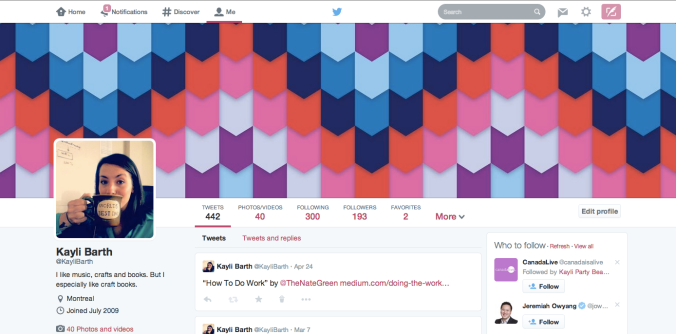
  1. Your Profile Page – for starters your profile pic is going to be much bigger in the new twitter. Don’t worry though, they’ll resize your old one for you. The big change is the full width header image. Use this 1500x500px space to make an impact and a great first impression. Twitter has some preloaded images you can choose from, like so… kaylibarth twitter profile header imageOr you can consider using the space as an advertisement or to make a statement about your brand like Jay Baer did here.JayBaer Twitter Profile Header ImageWhatever type of image you choose to go with, make sure it has a high enough resolution to look good. You don’t want a shotty looking stretched out header image to be the first thing someone sees when they visit your profile.
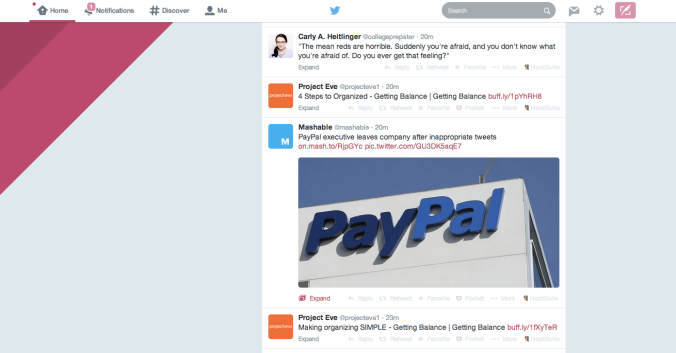
  2. In Your Tweets – Photos and videos now appear in your feed, not as links but as full images! This is great news for brands with a lot of visual content. You can start using this feature right away to stand out from the sea of text.twitter feed images
  3. With Website Cards – Twitter just began rolling out Website Cards – a new ad unit that allows you to feature a preview image, related context, and a clear call to action in your twitter ads. In their early experiments participating brands saw an increase in clickthrough rates and engagement. Twitter Website Cards

Focus on adding high quality, engaging images in these areas to seriously up your twitter interaction and presence.

What do you think of Twitter’s shift to more visual content?

Facebook Update Lets Brands Tag Other Pages in Posts

Facebook announced a news feed update on Tuesday that may extend a brand’s reach.

Now when a Page tags another Page in a post, that update may be seen by people who like or follow the tagged page. This feature has existed for a while for personal pages, but Facebook is just rolling it out now for brands.

This might seem like a great opportunity to take advantage of pages with huge followings for a chance to capture some of their audience. Tag Katy Perry or Disney in your post and get in front of their 50 million fans? Yes please! I can already imagine the abuse of this tactic! And so did Facebook. The pages and content have to be relevant to one another to appear in the non-followers news feed.

Brands can take advantage of this new feature by writing engaging content and tagging pages relevant to their stories. This way your updates have a chance of being seen by people that might be genuinely interested in your brand! Well played Facebook.

Setting Your 2014 Business Resolutions

clean-slateWith the New Year just around the corner, you’ve probably started thinking about your resolutions for 2014. But have you considered making business resolutions? Setting business goals can be done anytime, but it feels especially appropriate to do so with the clean slate of the New Year. Here are a few easy steps to making business resolutions sure to make 2014 your best year yet.

  1. Review your accomplishments: Start by looking at the past year, but don’t stop there. Think about the plans you made when you started your business. What achievements have you made? What goals did you set that haven’t been reached yet? Thinking about how far you’ve come will help you figure out where you want to go next year.
  2. Make a list: From your review you should have an idea of what your goals are. Write out those goals that you haven’t quite gotten around to, and add new goals that you want to focus on this year. Maybe your overall goal for the year is growth, but write out what that looks like for you. Do you want to attract new clients? Increase revenue? Hire new staff? Make your goals meaningful to you.
  3. Get specific: The more detailed you are with you are with your goals, the more likely you are to achieve them. Try to make all of your goals smart. SMART goals are goals that are Specific, Measurable, Attainable, Realistic and Timely. So rather than saying you want to attract new clients say you want to have 10% more clients by the end of the quarter.
  4. Display your list: The best way to stay on track is to have a constant reminder of your goals. Display your goals in your office or turn your list into a screensaver. Seeing your list will be a daily reminder of what you are working towards.
  5. Schedule a review: Set reminders in your calendar to review your list every quarter, or ideally every month. Reviewing your goals regularly will allow you to see your accomplishments and see where you need work.

If you follow these 5 steps you will set and KEEP your business resolutions and be on the path to make 2014 your most successful year yet.